Graphical Interfaces in Rust
I had a hard time piecing some of this together from the available docs, so I thought I'd write up a clean example for others:
Like most of the Rust ecosystem, GUI libraries are a work in progress. There are the usual crates for binding to C++ libraries (Wx, Gtk, etc) but there's really only one native-Rust GUI crate, egui. In typical Rust fashion, it's a little weird, but in ways that make a lot of sense once you internalize them.
Egui is an immediate-mode GUI system inspired by Dear ImGui. These were originally meant for game development, where you might need a quick debugging interface built into your game engine.
In a normal GUI system you instantiate a bunch of objects representing a tree of widgets, windows and buttons and labels and so on. The actual widget tree is owned by the library, and it handles rendering it to the screen and processing events you pass it. Handling those events probably interacts with your code, through callbacks. So there's a decent surface of things your code needs to accommodate: you need to make a rendering target the library can talk to, you need to pass it events the right way (you probably own the rendering target so you'll receive the events), you need to be able to receive callbacks, and so on. The result ends up being kind of inverted in that you're doing an event loop but also your code gets called arbitrarily by the library, so flow of control is tricky to tease out. Handling the callbacks, or any custom drawing, might involve making single-use subclasses of Button or something. It's ugly.
Immediate-mode GUIs are different: nothing is persisted or instantiated, at least by you. Every frame, you call functions which draw the entire UI fresh, and know as soon as you draw it whether that widget received an event trigger this frame. If it did, you handle the event right then, no callbacks. In order to draw the result, you don't give the library a rendering target, instead it returns to you a list of things for you to draw, since you've already set up your rendering pipeline and can draw things. For Egui, this amounts to a list of triangles you can put into an instance buffer and send to a shader (which Egui provides, just add it to your pipeline).
If your app just uses Egui, there's a crate called eframe which provides a simple default implementation of creating a window and event loop management (using winit). This even works for targeting wasm, and is the most trivial way to make a GUI app in Rust. So, let's do that:
struct Tenori { /* stuff */ }

fn main() {
    // Use winit to create a window and run an event loop for it
    eframe::run_native("Tenori", eframe::NativeOptions::default(), Box::new(|_cc| {
        Ok(Box::new(Tenori { }))
    })).expect("Error running application");
}

impl eframe::App for Tenori {
    // draw things:
    fn update(&mut self, ctx: &Context, _frame: &mut Frame) {
        // Make a little window inside the OS-level one
        let win = eframe::egui::Window::new("Greeting");
        win.show(ctx, |ui| {
            // Draw a button and respond to clicks on it
            if ui.button("Hello!").clicked() {
                println!("Hey")
            }
        });
    }
}
Doing that results in something like this:
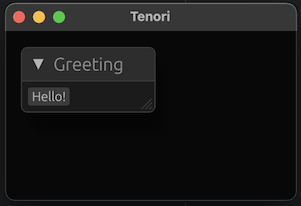
Under the hood, run_native is doing something like this:
let raw_input = egui::RawInput {
    screen_rect: Some(/* etc */),
    events: /* events from the OS */,
    ..Default::default()
};

let stuff_to_draw = self.context.run(raw_input, |ctx| {
    self.app.update(self.context, self.frame)
});
Since it's aware of the events (including pointer position, mouse button state) we know as soon as we add a button to the layout whether it was clicked, and can handle the click right then, no callbacks.
The name "Tenori" wasn't picked arbitrarily, I'm making a little musical toy like a Tenori-On. As of right now it looks like this:
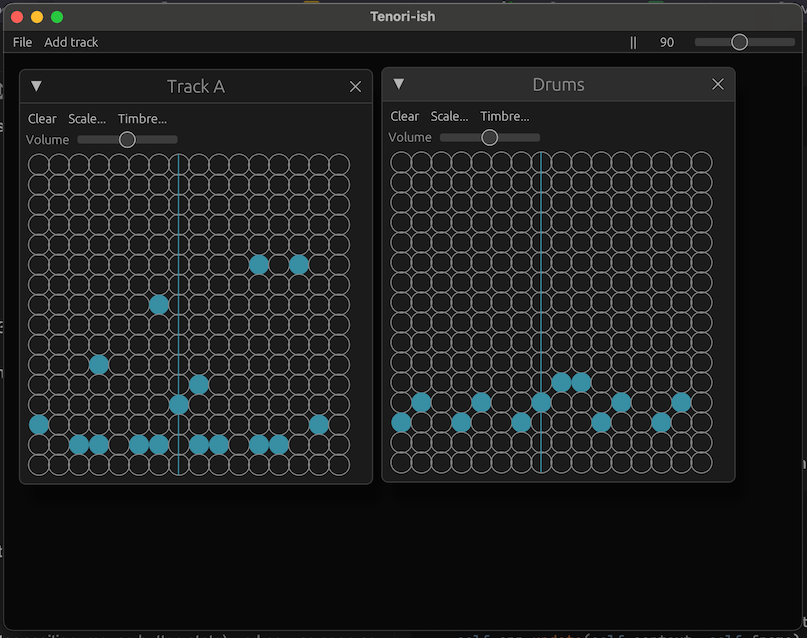
The line sweeps across the grid and plays notes when it hits a dot. So part of the app needs to draw custom graphics. It's obviously not a complete graphics system but Egui gives us enough to draw custom widgets.
First, we need to set aside some space. This lets Egui still manage the layout, further things we draw after this won't overlap this. We get back a rectangle we're allowed to scribble in. We also tell it what we want to "sense," which inputs this widget might respond to:
let (rect, response) = ui.allocate_exact_size(Vec2::new(dim, dim), Sense::click_and_drag());
After that, we can use normal-looking drawing functions to, well, draw things:
ui.painter().vline(/* etc */);
// ...etc...
ui.painter().circle_filled(center, radius, Color32::from_rgb(80, 140, 160));
When we allocated the space, we also got a response containing relevant events this frame in is. Responding to events means looking at that response:
if response.contains_pointer() {
    ui.input(|input| {
        if input.pointer.button_clicked(PointerButton::Primary) &&
            let Some(pos) = input.pointer.latest_pos() {
                // do stuff
            }
        })
    }
}
So that's the bones of making a GUI and driving it, the rest is just looking up the exact Egui functions for creating various widgets.
The code for the complete Tenori-ish app is here.